유튜브에서는 홈 탭, 구독 탭, 보관함 탭 등을 눌러 창을 이동해도,
이전 창에서의 데이터를 모두 유지합니다.
저는 이를 구현해 보기 위해서, 각 프레그먼트를 미리 추가해 놓고 show, hide 매소드를 이용하고 있었습니다.
[Android] #9 컴포넌트 설계 수정
빠르게 피드백을 받아보고자, 플레이리스트 기능을 제외하고 출시를 했었습니다. 해당 기능에 대한 고려 없이 개발을 했던 것 같습니다. 추가하려던 찰나 컴포넌트 설계를 잘못했다는 것을 깨
joh9911-programming-note.tistory.com
한눈에 보기 복잡한 Backpress 처리가 필요했었습니다.
// ex) 하나의 프레그먼트
callback = object : OnBackPressedCallback(true) {
            override fun handleOnBackPressed() {

                if (childFragmentManager.backStackEntryCount == 0) {
                    if (searchViewItem.isActionViewExpanded){
                        searchViewItem.collapseActionView()
                    }
                }else{
                    if (binding.searchSuggestionKeywordRecyclerView.isVisible)
                        searchViewCollapseEvent()
                    else
                        childFragmentManager.popBackStack()
                }
            }
        }
        childFragmentManager.addOnBackStackChangedListener {
            if (childFragmentManager.backStackEntryCount == 0) {
                if (searchViewItem.isActionViewExpanded)
                    searchViewItem.collapseActionView()
                callback.remove()
            }
            else
                activity.onBackPressedDispatcher.addCallback(this, callback)
        }
    }
프레그먼트뿐만이 아니라, searchView 관련 매소드에서도 처리를 해야 했고,
그에 따라 현재 쌓인 백스택의 개수 또한 신경을 써야 했습니다.
MVVM 패턴을 적용하는 동시에 기존의 프레그먼트 관리 방식을 Navigation Component로 수정을 했습니다.
메인 화면
메인 화면에서는 두 개의 프레그먼트를 이용하고 있습니다.
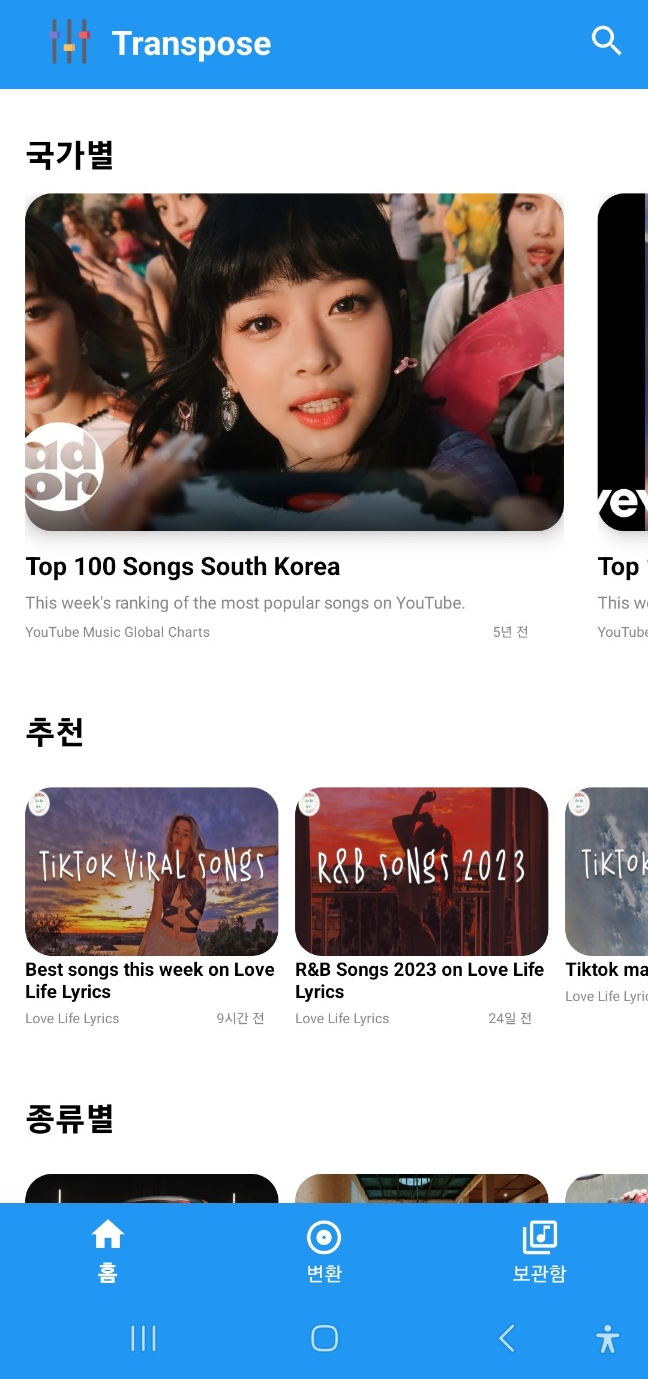
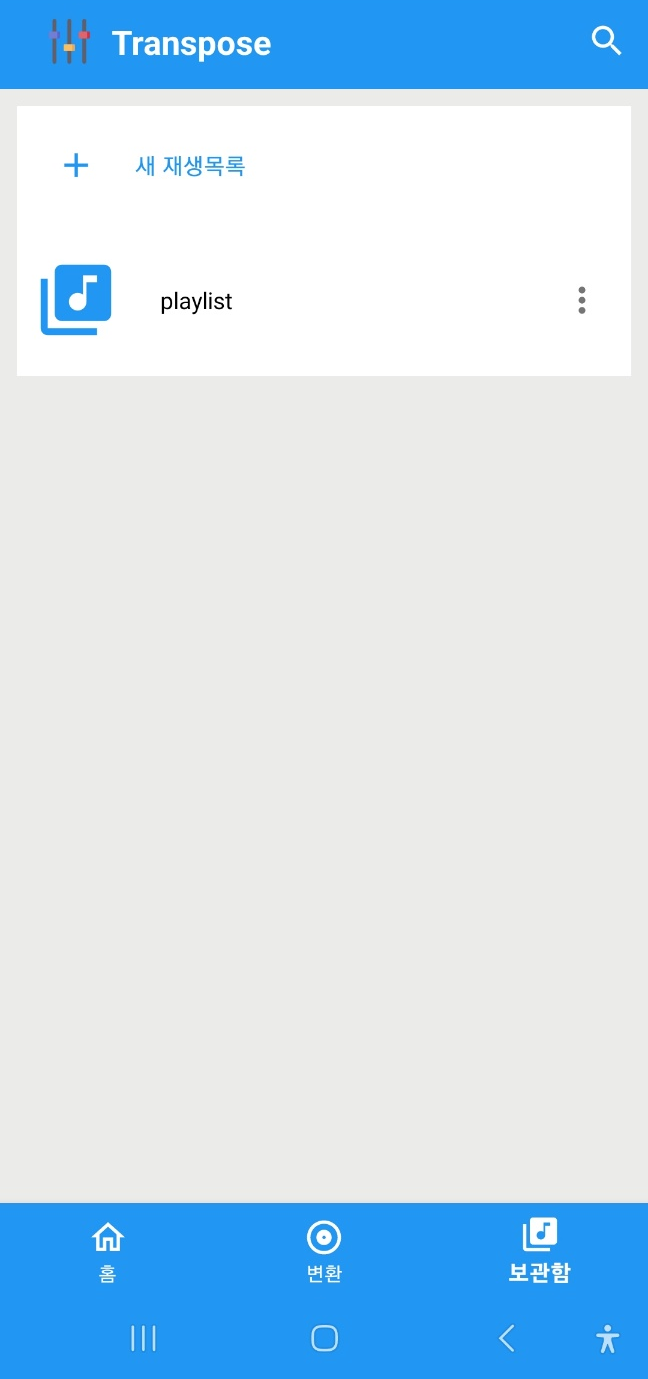
홈 프레그먼트, 보관함 프레그먼트이며, 프레그먼트 내부의 프레그먼트들을 관리해 주는 역할을 합니다.
가운데 변환 버튼은 단지 메인 화면 내의 View의 visiblity를 조정하는 역할을 합니다.
<main.xml>
<?xml version="1.0" encoding="utf-8"?>
<androidx.coordinatorlayout.widget.CoordinatorLayout
    xmlns:android="http://schemas.android.com/apk/res/android"
    xmlns:app="http://schemas.android.com/apk/res-auto"
    android:id="@+id/main_coordinator_layout"
    android:layout_width="match_parent"
    android:layout_height="match_parent"
    android:background="@color/white">

    <androidx.fragment.app.FragmentContainerView
        android:id="@+id/main_nav_host"
        android:layout_width="match_parent"
        android:layout_height="match_parent"
        android:name="androidx.navigation.fragment.NavHostFragment"
        app:defaultNavHost="true"
        app:navGraph="@navigation/main_nav_graph"
        />

        <com.google.android.material.bottomnavigation.BottomNavigationView
        android:id="@+id/bottom_navigation_view"
        android:layout_width="match_parent"
        android:layout_height="wrap_content"
        android:layout_gravity="bottom"
        android:background="@color/blue_background"
        app:itemIconTint="@color/white"
        app:itemTextColor="@color/white"
        app:labelVisibilityMode="labeled"
        app:menu="@menu/bottom_navi_item"/>

        /...
가장 메인이 되는 화면이라, 뒤로가기 버튼을 가로채기 위해 defaultNavHost를 true로 설정했습니다.
다음은 메인 화면의 탐색 그래프입니다.

<main_nav_graph.xml>
<?xml version="1.0" encoding="utf-8"?>
<navigation xmlns:android="http://schemas.android.com/apk/res/android"
    xmlns:app="http://schemas.android.com/apk/res-auto"
    xmlns:tools="http://schemas.android.com/tools"
    android:id="@+id/main_nav_graph"
    app:startDestination="@id/homeFragment">

    <fragment
        android:id="@+id/homeFragment"
        android:name="com.myFile.transpose.view.fragment.HomeFragment"
        android:label="HomeFragment"
        tools:layout="@layout/fragment_home">
        <action
            android:id="@+id/action_homeFragment_to_libraryFragment"
            app:destination="@id/libraryFragment"
            />
    </fragment>
    <fragment
        android:id="@+id/libraryFragment"
        android:name="com.myFile.transpose.view.fragment.LibraryFragment"
        android:label="LibraryFragment"
        tools:layout="@layout/fragment_library">
        <action
            android:id="@+id/action_libraryFragment_to_homeFragment"
            app:destination="@id/homeFragment"/>
    </fragment>
</navigation>
BottomNavigationView에서 탭을 누를 시, 해당 프레그먼트로 이동해야 합니다.
또한 다른 탭을 눌러 이동했다가, 다시 돌아와도 이전의 데이터가 유지되어야 합니다.
공식 문서에 해당 방법이 나와있었습니다.

몇 가지 문제점이 있었습니다.
1. 세 개의 탭이 있지만 두 개의 프레그먼트를 이용하므로, 나머지 하나의 탭의 이벤트 설정이 어려움
2. 해당 탭을 클릭할 때 선택된 표시가 나지 않음
3. 동시에 프레그먼트의 정보를 기억해야 함
따라서 다른 방법을 이용했습니다.
<MainActivity.kt>
private fun initBottomNavigationView(){
    bottomNavigationView = binding.bottomNavigationView
    val navHostFragment = supportFragmentManager.findFragmentById(R.id.main_nav_host) as NavHostFragment
    navController = navHostFragment.navController

    // 탭을 눌렀을 때 check 상태로 만들기
    navController.addOnDestinationChangedListener { controller, destination, arguments ->
        when (destination.id){
            R.id.homeFragment -> bottomNavigationView.menu.findItem(R.id.homeFragment).isChecked = true
            R.id.libraryFragment -> bottomNavigationView.menu.findItem(R.id.libraryFragment).isChecked = true
        }
        transposePage.visibility = View.INVISIBLE
    }

    bottomNavigationView.setOnItemSelectedListener { item ->
        when (item.itemId) {
            R.id.homeFragment -> {
                transposePage.visibility = View.INVISIBLE
            }
            R.id.transpose_icon -> {
                transposePage.visibility = View.VISIBLE
            }
            R.id.libraryFragment -> {
                transposePage.visibility = View.INVISIBLE
            }
        }
        // onNavDestinationSelected를 이용하여 state 저장 및 destination 업데이트
        item.onNavDestinationSelected(navController)
    }
}
홈 화면
홈 화면은 세 개의 프레그먼트로 구성이 되어 있습니다.
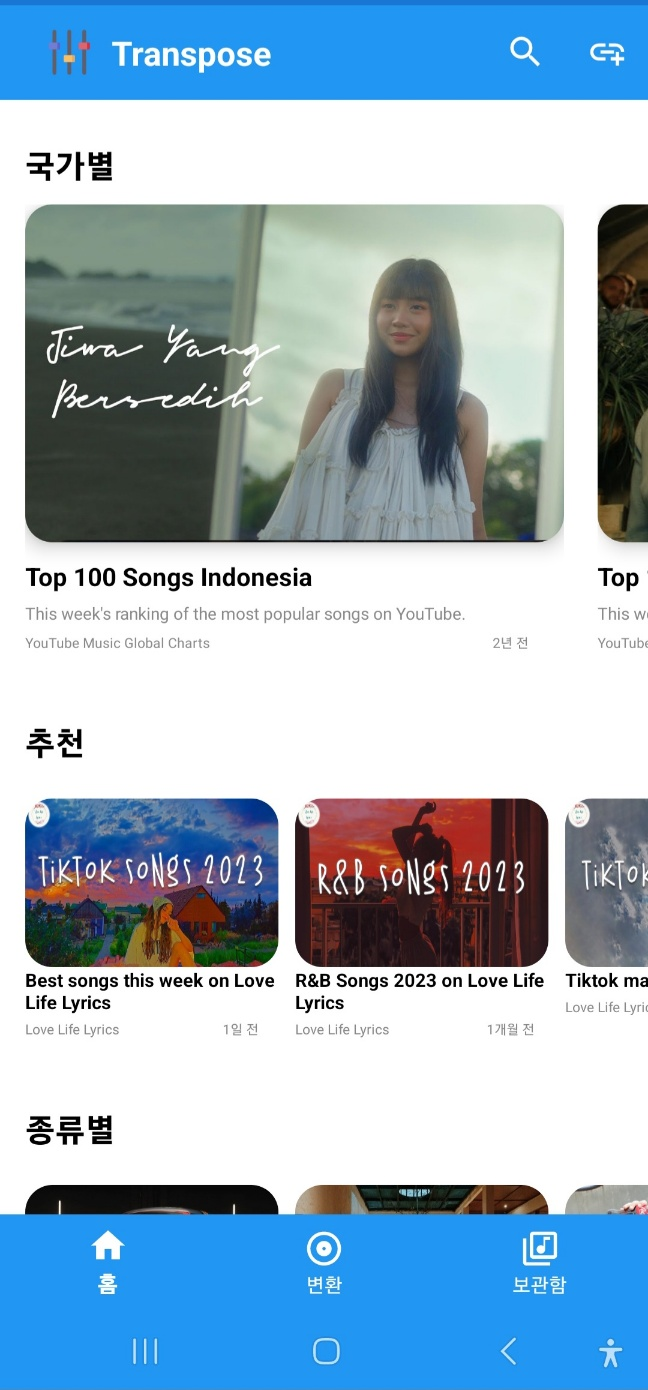

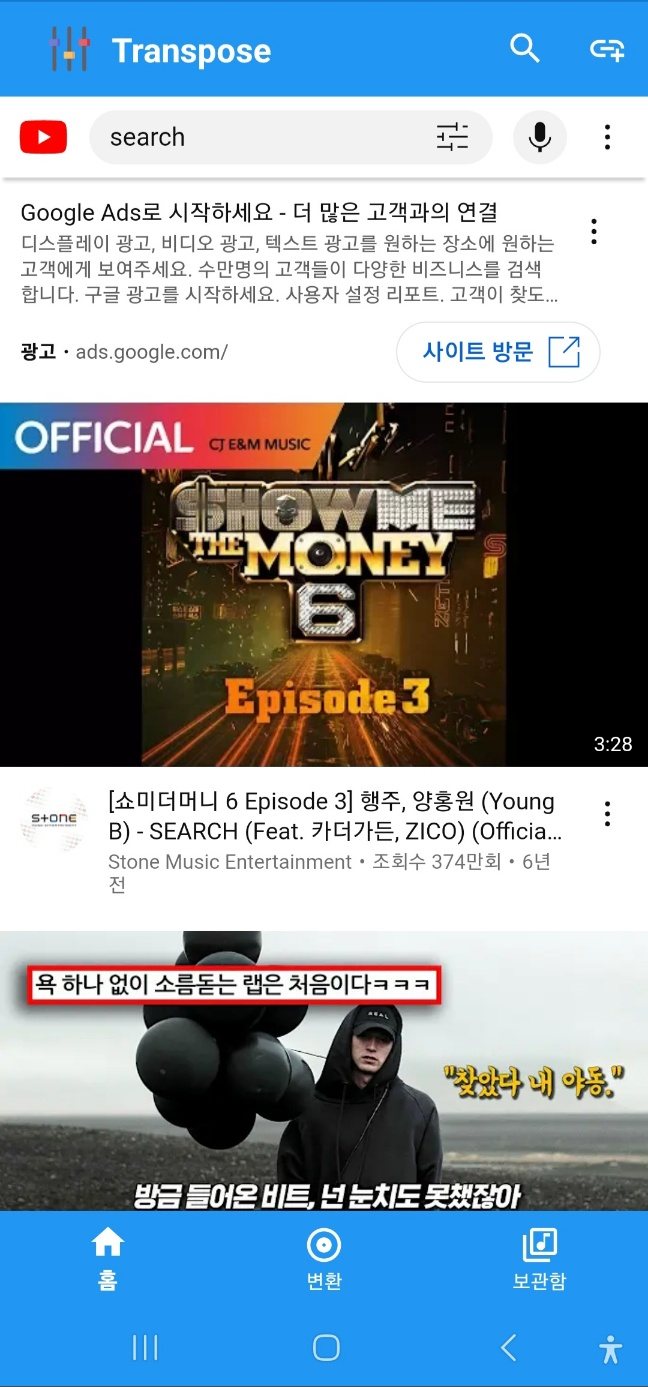
첫 번째 화면에서 플레이리스트를 클릭 시 두 번째 프레그먼트로 이동이 됩니다.
검색어 버튼을 눌러 검색 키워드를 입력할 시, 세 번째 프레그먼트로 이동이 됩니다.
<fragment_home.xml>
<?xml version="1.0" encoding="utf-8"?>
<androidx.constraintlayout.widget.ConstraintLayout
    xmlns:android="http://schemas.android.com/apk/res/android"
    xmlns:app="http://schemas.android.com/apk/res-auto"
    android:layout_width="match_parent"
    android:layout_height="match_parent">
    <androidx.appcompat.widget.Toolbar
        android:id="@+id/home_fragment_tool_bar"
        android:layout_width="match_parent"
        android:layout_height="wrap_content"
        android:background="@color/blue_background"
        app:collapseIcon="@drawable/ic_baseline_arrow_back_24"
        app:layout_constraintTop_toTopOf="parent"
        android:fitsSystemWindows="true"
        app:menu="@menu/tool_bar">
        <ImageView
            android:layout_width="50dp"
            android:layout_height="50dp"
            android:src="@mipmap/app_icon_foreground"/>

        <TextView
            android:layout_width="wrap_content"
            android:layout_height="wrap_content"
            android:text="Transpose"
            android:textSize="20dp"
            android:textColor="@color/white"
            android:textStyle="bold"
            android:layout_gravity="left"/>
    </androidx.appcompat.widget.Toolbar>

    <androidx.fragment.app.FragmentContainerView
        android:id="@+id/home_nav_host"
        android:layout_width="0dp"
        android:layout_height="0dp"
        android:name="androidx.navigation.fragment.NavHostFragment"
        app:layout_constraintTop_toBottomOf="@id/home_fragment_tool_bar"
        app:layout_constraintStart_toStartOf="parent"
        app:layout_constraintEnd_toEndOf="parent"
        app:layout_constraintBottom_toBottomOf="parent"
        app:navGraph="@navigation/home_nav_graph"
        />

    <androidx.recyclerview.widget.RecyclerView
        android:id="@+id/search_suggestion_keyword_recycler_view"
        android:layout_width="match_parent"
        android:layout_height="0dp"
        android:background="@color/white"
        app:layout_constraintTop_toBottomOf="@id/home_fragment_tool_bar"
        app:layout_constraintBottom_toBottomOf="parent"
        android:visibility="invisible"/>

</androidx.constraintlayout.widget.ConstraintLayout>
다음은 홈 화면의 탐색 그래프입니다.
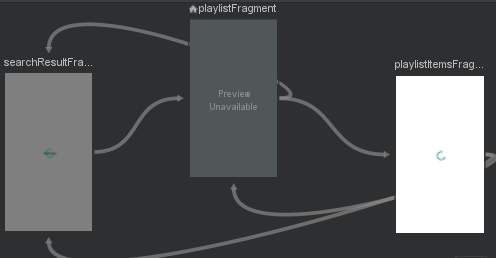
<home_nav_graph.xml>
<?xml version="1.0" encoding="utf-8"?>
<navigation xmlns:android="http://schemas.android.com/apk/res/android"
    xmlns:app="http://schemas.android.com/apk/res-auto"
    xmlns:tools="http://schemas.android.com/tools"
    android:id="@+id/home_nav_graph"
    app:startDestination="@id/playlistFragment">

    <fragment
        android:id="@+id/playlistItemsFragment"
        android:name="com.myFile.transpose.view.fragment.PlaylistItemsFragment"
        android:label="PlaylistItemsFragment"
        tools:layout="@layout/fragment_playlist_item">
        <action
            android:id="@+id/action_playlistItemsFragment_to_playlistFragment"
            app:destination="@id/playlistFragment"
            />
        <action
            android:id="@+id/action_playlistItemsFragment_to_searchResultFragment"
            app:destination="@id/searchResultFragment" />
    </fragment>

    <fragment
        android:id="@+id/searchResultFragment"
        android:name="com.myFile.transpose.view.fragment.SearchResultFragment"
        android:label="SearchResultFragment"
        tools:layout="@layout/fragment_search_result">
        <action
            android:id="@+id/action_searchResultFragment_to_playlistFragment"
            app:destination="@id/playlistFragment" />
    </fragment>

    <fragment
        android:id="@+id/playlistFragment"
        android:name="com.myFile.transpose.view.fragment.PlaylistFragment"
        android:label="PlaylistFragment" >
        <action
            android:id="@+id/action_playlistFragment_to_playlistItemsFragment"
            app:destination="@id/playlistItemsFragment"
            />
        <action
            android:id="@+id/action_playlistFragment_to_searchResultFragment"
            app:destination="@id/searchResultFragment"
            />
    </fragment>
</navigation>
메인에서 뒤로 가기 버튼을 가로채게 해 놨고 홈 프레그먼트에 searchView관련 뷰들이 있으므로,
홈프레그먼트에서는 onBackPressCallback을 설정해야 합니다.
<HomeFragment.kt>
override fun onStart() {
    super.onStart()
    callback = object : OnBackPressedCallback(true) {
        override fun handleOnBackPressed() {
            when (navController.currentDestination?.id) {
                R.id.playlistFragment -> {
                    if (searchViewItem.isActionViewExpanded) {
                        searchViewItem.collapseActionView()
                    } else {
                        isEnabled = false
                        activity.onBackPressed()
                    }
                }
                R.id.playlistItemsFragment -> {
                    if (searchViewItem.isActionViewExpanded)
                        searchViewItem.collapseActionView()
                    else
                        navController.navigateUp()
                }
                R.id.searchResultFragment -> {
                    if (searchViewItem.isActionViewExpanded) {
                        searchViewItem.collapseActionView()
                    }else{
                        navController.navigateUp()
                    }
                }
            }
        }
    }
    activity.onBackPressedDispatcher.addCallback(this, callback)
}
현재 목적지가 시작 목적지일 경우 액티비티에서 뒤로 가기를 처리하게 하며,
서치뷰가 확장 상태일 때는 서치뷰를 닫으며, 그 외에는 이전 목적지로 돌아가게끔 했습니다.
보관함 화면
홈 화면과 똑같이 3개의 화면이 있습니다.
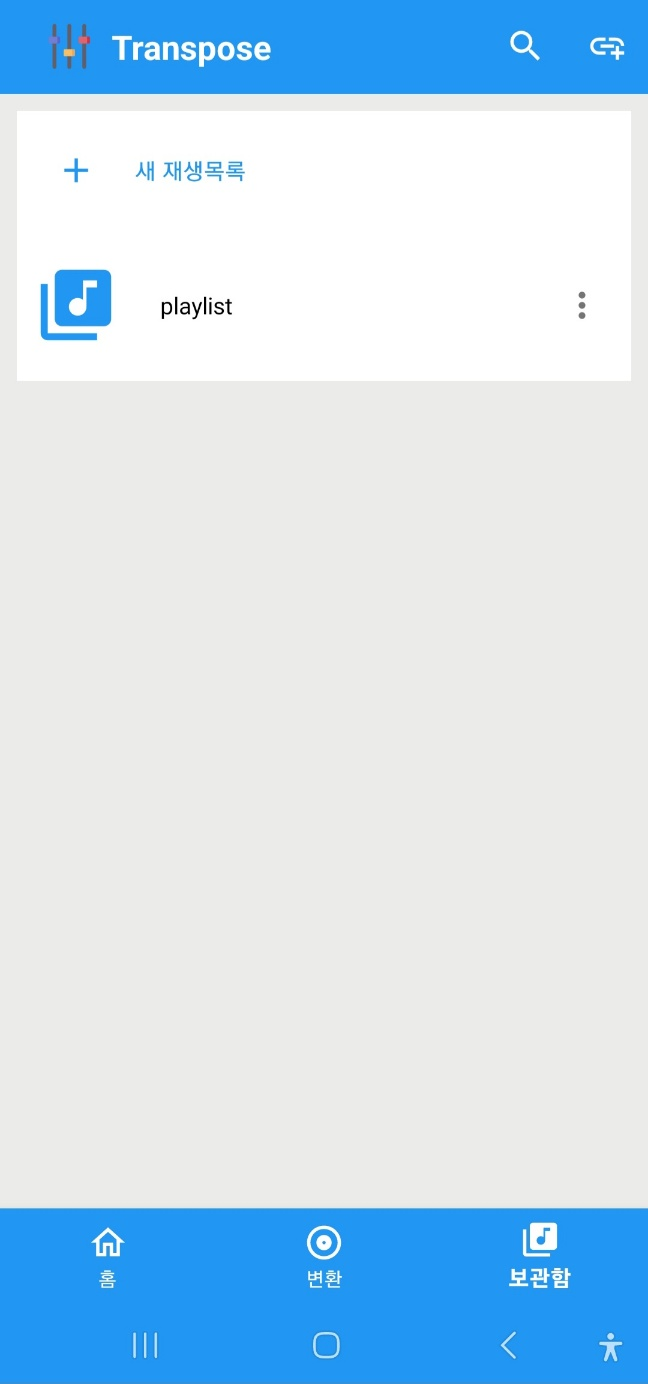


홈 화면과 작동 방식이 똑같습니다.
<fragment_library.xml>
<?xml version="1.0" encoding="utf-8"?>
<androidx.constraintlayout.widget.ConstraintLayout
    xmlns:android="http://schemas.android.com/apk/res/android"
    xmlns:app="http://schemas.android.com/apk/res-auto"
    android:layout_width="match_parent"
    android:layout_height="match_parent"
    >
    <androidx.appcompat.widget.Toolbar
        android:id="@+id/playlist_tool_bar"
        android:layout_width="match_parent"
        android:layout_height="wrap_content"
        android:background="@color/blue_background"
        app:collapseIcon="@drawable/ic_baseline_arrow_back_24"
        app:layout_constraintTop_toTopOf="parent"
        android:fitsSystemWindows="true"
        app:menu="@menu/tool_bar">
        <ImageView
            android:layout_width="50dp"
            android:layout_height="50dp"
            android:src="@mipmap/app_icon_foreground"/>

        <TextView
            android:layout_width="wrap_content"
            android:layout_height="wrap_content"
            android:text="Transpose"
            android:textSize="20dp"
            android:textColor="@color/white"
            android:textStyle="bold"
            android:layout_gravity="left"/>
    </androidx.appcompat.widget.Toolbar>

    <androidx.fragment.app.FragmentContainerView
        android:id="@+id/library_nav_host"
        android:layout_width="0dp"
        android:layout_height="0dp"
        android:name="androidx.navigation.fragment.NavHostFragment"
        app:layout_constraintTop_toBottomOf="@id/playlist_tool_bar"
        app:layout_constraintStart_toStartOf="parent"
        app:layout_constraintEnd_toEndOf="parent"
        app:layout_constraintBottom_toBottomOf="parent"
        app:navGraph="@navigation/library_nav_graph"/>


    <androidx.recyclerview.widget.RecyclerView
        android:id="@+id/search_suggestion_keyword_recycler_view"
        android:layout_width="match_parent"
        android:layout_height="0dp"
        android:background="@color/white"
        app:layout_constraintTop_toBottomOf="@id/playlist_tool_bar"
        app:layout_constraintBottom_toBottomOf="parent"
        android:visibility="invisible"/>

</androidx.constraintlayout.widget.ConstraintLayout>
<library_nav_graph.xml>
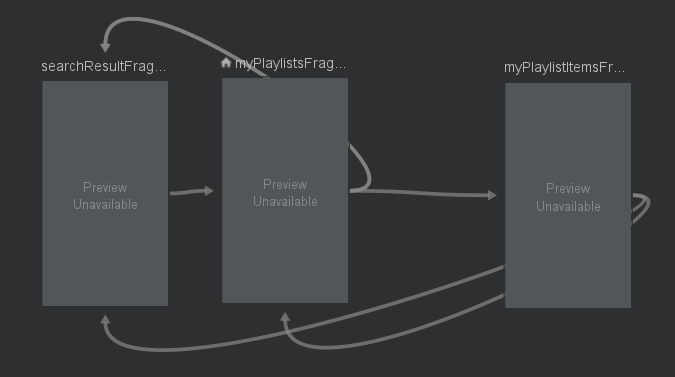
<?xml version="1.0" encoding="utf-8"?>
<navigation xmlns:android="http://schemas.android.com/apk/res/android"
    xmlns:app="http://schemas.android.com/apk/res-auto"
    android:id="@+id/library_nav_graph"
    app:startDestination="@id/myPlaylistsFragment">

    <fragment
        android:id="@+id/myPlaylistsFragment"
        android:name="com.myFile.transpose.view.fragment.MyPlaylistsFragment"
        android:label="MyPlaylistsFragment" >
        <action
            android:id="@+id/action_myPlaylistsFragment_to_myPlaylistItemsFragment"
            app:destination="@id/myPlaylistItemsFragment"


            />
        <action
            android:id="@+id/action_myPlaylistsFragment_to_searchResultFragment"
            app:destination="@id/searchResultFragment"
            />
        <action
            android:id="@+id/action_myPlaylistsFragment_to_searchResultFragment2"
            app:destination="@id/searchResultFragment" />
    </fragment>

    <fragment
        android:id="@+id/myPlaylistItemsFragment"
        android:name="com.myFile.transpose.view.fragment.MyPlaylistItemsFragment"
        android:label="MyPlaylistItemsFragment" >
        <action
            android:id="@+id/action_myPlaylistItemsFragment_to_myPlaylistsFragment"
            app:destination="@id/myPlaylistsFragment" />
        <action
            android:id="@+id/action_myPlaylistItemsFragment_to_searchResultFragment"
            app:destination="@id/searchResultFragment" />
    </fragment>

    <fragment
        android:id="@+id/searchResultFragment"
        android:name="com.myFile.transpose.view.fragment.SearchResultFragment"
        android:label="SearchResultFragment" >
        <action
            android:id="@+id/action_searchResultFragment_to_myPlaylistsFragment"
            app:destination="@id/myPlaylistsFragment" />
    </fragment>
</navigation>
홈 화면과 마찬가지로 onBackPressCallback을 설정했습니다.
<LibraryFragment.kt>
override fun onStart() {
    super.onStart()
    callback = object : OnBackPressedCallback(true) {
        override fun handleOnBackPressed() {

            when (navController.currentDestination?.id) {
                R.id.myPlaylistsFragment -> {
                    if (searchViewItem.isActionViewExpanded)
                        searchViewItem.collapseActionView()
                    else {
                        isEnabled = false
                        activity.onBackPressed()
                    }
                }
                R.id.myPlaylistItemsFragment -> {
                    if (searchViewItem.isActionViewExpanded)
                        searchViewItem.collapseActionView()
                    else
                        navController.navigateUp()
                }
                R.id.searchResultFragment -> {
                    if (searchViewItem.isActionViewExpanded)
                        searchViewItem.collapseActionView()
                    else
                        navController.navigateUp()
                }
            }
        }
    }
    callback?.let { activity.onBackPressedDispatcher.addCallback(this, it) }
}
결과

'안드로이드 프로젝트 > 유튜브 음정 조절 어플리케이션' 카테고리의 다른 글
| [Android] # 13 MVVM 패턴 적용 (0) | 2023.08.14 |
|---|---|
| [Android] # 문제 해결 - 6 Room 마이그레이션 실수.. (0) | 2023.07.06 |
| [Android] # 문제 해결 - 5 앱 이슈 해결 (0) | 2023.07.01 |
| [Android] #12 mediaSession 공부 및 코드 리팩토링 - 1 (0) | 2023.06.29 |
| [Android] #11 Youtube data api 할당량 최적화 (데이터 캐싱) (0) | 2023.06.27 |


댓글